The Golang Challenges are a series of monthly Go challenges organized by JoshSoftware Pvt. Ltd. I always read about the challenges but never participated. The October Golang Challenge (aka the 7th challenge) was released. With my background in Android, I was really intrigued to see how easy / hard it would be so I decided to jump into the rabbit hole. This post details that journey including design decisions (a layer system to easily add visual objects), gotchas (screen orientation problems), other interesting parts (generating sound).
Layer System
When I finished my first version of the piano, it was very basic. But the code was complex with tons of if-statements. I thought to myself, if I wanted to add any more interactive parts (like a dialog box) I need to somehow reduce the complexity to make adding them sustainable. That’s where the layer system comes into play.
The layer system idea stemmed from Photoshop. You have independent layers and a layer manger coordinates inter-layer events. Each layer just implements handling the events independently. For example, having a layer of only white piano keys and another layer of only black piano keys.
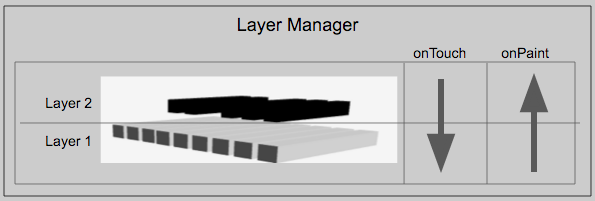
Golang Challenge Order of Layer Operation
Every layer has a basic interface to implement.
type layer interface {
	onPaint(gl.Context, size.Event, util.FrameData)  // queue
	// onTouch returns two outputs, 1) whether the event has been consumed or
	// 2) should tell all other layers to disable
	onTouch(float32, float32, touch.Event, util.FrameData, bool) (bool, bool)
	onStop(gl.Context)
}
For simple events like painting, the layers should be painted from the first layer upwards. In this case, this ordering would make sure that the white keys didn’t paint over the black keys.
// PaintLayers handles the paint event for the layers. It paints the layers FIFO.
func (m *Manager) PaintLayers(sz size.Event, frameData util.FrameData) {
	for _, layer := range m.layers {
		layer.onPaint(m.glctx, sz, frameData)
	}
}
For touch events, the layer system allows us to regulate how many layers the touch event will reach before terminating the touch event. If we detect that a black key is touched, we terminate the event, and the lower layers don’t get to handle the event. One additional case for this challenge was sliding gesture. Essentially, at a given point, we might slide from key to key. That means we could be moving from one layer (e.g. white keys) to another layer (e.g. black keys). We need to tell the remaining layers to not do anything but disable itself.
The disable and skip cases for touch events can be seen here:
// TouchLayers handles the touch event for the layers. It handles the event like a stack.
// The top layer decides if it will consume the layer or pass it on.
func (m *Manager) TouchLayers(x float32, y float32, event touch.Event, frameData util.FrameData) {
	disableLowerLayer := false
	finished := false
	for idx := len(m.layers) - 1; idx >= 0; idx-- {
		if finished, disableLowerLayer = m.layers[idx].onTouch(x, y, event, frameData, disableLowerLayer); finished {
			break
		}
	}
}
Screen Orientation
At the time I started, I saw this issue regarding gomobile not respecting the orientation to stay in specified in the AndroidManifest.xml. This would cause the app to rotate whenever the phone was rotated and the app would get compressed when in portrait mode.
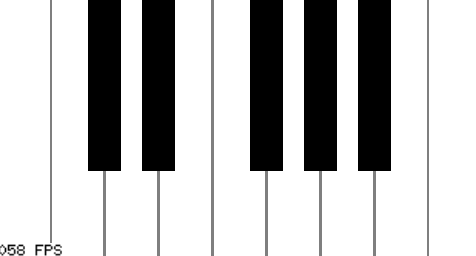
Landscape Mode
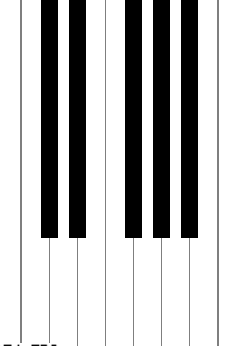
Distorted Portrait Mode
My temporary solution was to detect when in portrait mode vs landscape mode.
case size.Event:
	sz = event
	// Always want to make sure we draw the keys in which there is the most width.
	if (sz.WidthPx >= sz.HeightPx) && ((frameData.Orientation == util.Portrait) ||
		(frameData.Orientation == util.UnsetOrientation)) {
		// Most likely the phone is landscape and need to switch flag.
		frameData.Orientation = util.Landscape
	} else if (sz.WidthPx < sz.HeightPx) &&
		((frameData.Orientation == util.Landscape) ||
		(frameData.Orientation == util.UnsetOrientation)) {
			// Most likely the phone is portrait and need to switch flag.
			log.Printf("going portrait\n")
			frameData.Orientation = util.Portrait
	}
Once I detected what orientation, I would draw the components in `landscape mode` or `90 degrees rotated in portrait mode`. This would always draw the components in landscape mode and keep the layout usable.
// First six coordinates are for landscape, second six are for portrait
func makeCoordsForBothOrientation(keyOutline util.Boundary) []float32 {
	return []float32{
		// Landscape
		keyOutline.LeftX, keyOutline.TopY, // top left
		keyOutline.LeftX, keyOutline.BottomY, // bottom left
		keyOutline.RightX, keyOutline.BottomY, // bottom right
		keyOutline.LeftX, keyOutline.TopY, // top left
		keyOutline.RightX, keyOutline.BottomY, // bottom right
		keyOutline.RightX, keyOutline.TopY, // top right

		// Portrait
		util.MaxGLSize-keyOutline.TopY, keyOutline.LeftX, // top left
		util.MaxGLSize-keyOutline.BottomY, keyOutline.LeftX, // bottom left
		util.MaxGLSize-keyOutline.BottomY, keyOutline.RightX, // bottom right
		util.MaxGLSize-keyOutline.TopY, keyOutline.LeftX, // top left
		util.MaxGLSize-keyOutline.BottomY, keyOutline.RightX, // bottom right
		util.MaxGLSize-keyOutline.TopY, keyOutline.RightX, // top right
	}
}
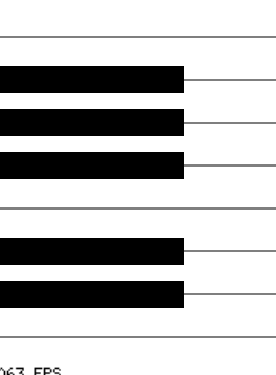
Piano is rotated when in Portrait Mode after the fix
Luckily, this issue has been fixed with a CL from Daniel Skinner. You can now use the AndroidManifest.xml and specify which orientation to lock into and avoid this workaround
Audio
Generating audio reminded me of engineering school. Things like Nyquist Sample Frequency, Sine Waves, etc all came rushing back. For the exact piano note frequencies, this wikipedia page helped out.
In Go, the note sound data is stored in []byte. This means that the possible values range between 0-255. But a sine wave range ranges between -1 and 1. This means after creating the sine wave data, it had to be scaled and shifted to fit the 0 – 255 range.
func GenSound(note util.KeyNote) []byte {
	hz := math.Pow(FrequencyConstant, float64(note)-49.0) * 440.0
	L := int(SampleRate * SampleDuration)
	f := (2.0 * math.Pi * hz) / SampleRate
	data := make([]byte, L, L)
	for sample := 0; sample < L; sample++ {
		data[sample] = byte(128.0 * (math.Sin(f*float64(sample)) + 1.0))
	}
	return data
}
Wrap-Up
This project was really fun to tackle. I wish I could have added new layers like a dialog box. However, I ran out of time. It’s funny because the layer system took more time than expected and it was originally for helping me to add more objects. I originally tried mobile with Go back in 1.4 and it was such a pain to setup. Now, there’s a gomobile tool to get everything together. It’s great to see how quickly things have improved.
The project itself is named Amadeus. The name is the middle name of Mozart. My code can be found here.